Live monitoring for your OpenWrt home network

Your network’s pulse.
Real time. No cloud.

NetPulse watches over OpenWrt routers, maps your topology, scores your network health and alerts you, all from a single self-hosted binary. Nothing leaves your LAN.

No cloud 100% free · AGPL-3.0 Your app, your data One static binary OpenWrt / GL.iNet OpenWrt .ipk package
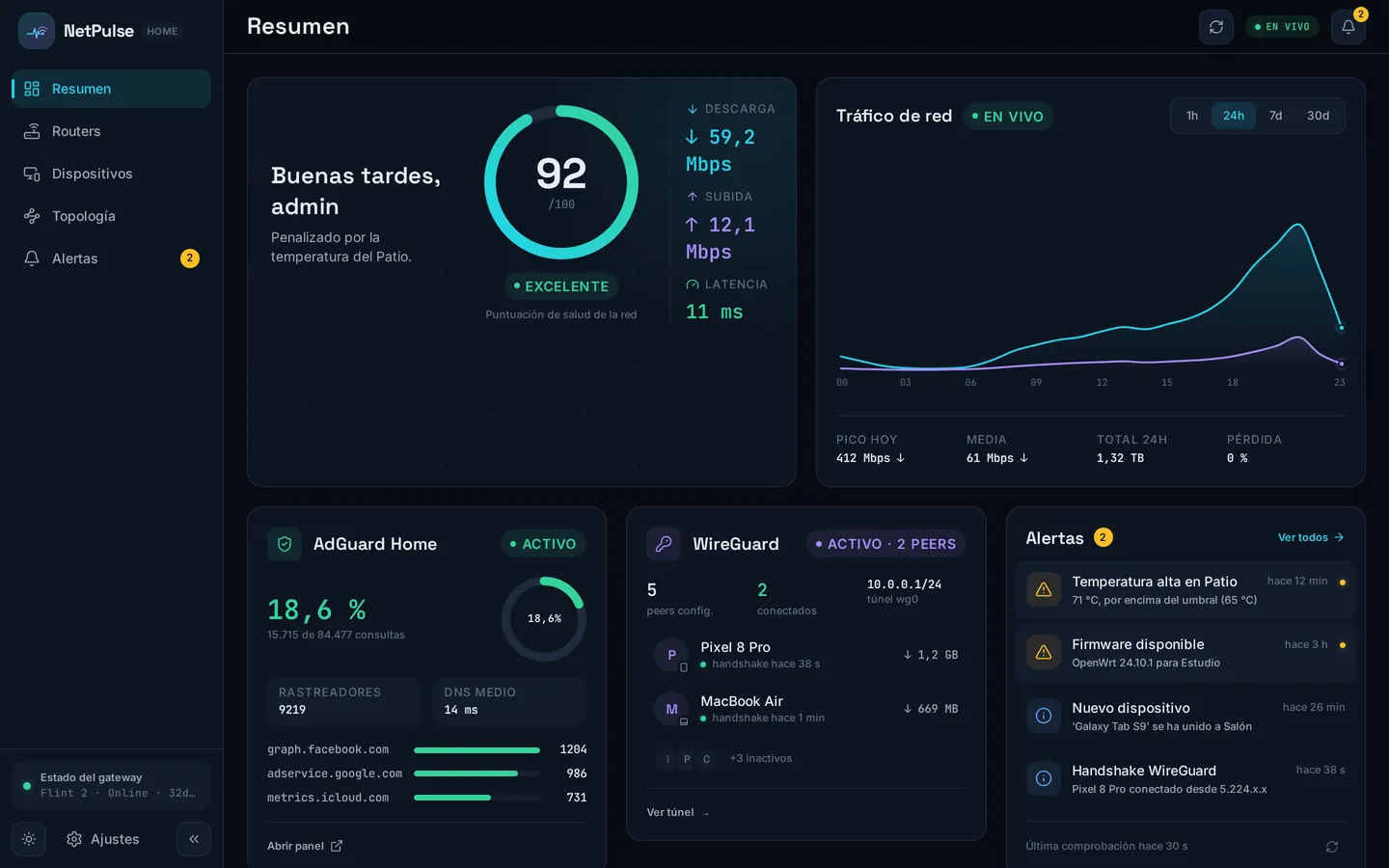
Health 92/100
Download 84.2 Mbps
Upload 12.6 Mbps
Latency 8 ms
Devices 65
NetPulse overview: network health, traffic and devices
Part of the Cloudless Club

Cloudless club principles

NetPulse follows the three principles of the Cloudless Club: digital sovereignty, free forever, and by people, not companies. They are shared by every app in the club and live in a single place.

Meet the club
How it works

From zero to home NOC in five minutes

No Docker, no accounts, no endless wizards. Three steps and your network starts talking.

01

Install the server

A single static Go binary with the web app embedded. Runs as a sandboxed systemd service on any Linux box (x86_64, arm64, armv7) - or on the OpenWrt router itself.

02

Pair your routers

One-time pairing token and a native .ipk agent (procd, UCI, watchdog). Agentless works too: strictly read-only SSH polling.

03

Open the app

An installable PWA for phone and desktop, live over SSE every 5 s. Multi-user with admin/viewer roles and per-user language.

≈ 5 min install
demo data

Watch it come alive

Keep scrolling. These are the real widgets, fed with the demo dataset, the same numbers you get when you run NetPulse in demo mode.

01

One number tells the whole story

The health score condenses latency, loss, uptime and temperature into 0-100. Green means calm. It updates every 5 seconds over SSE.

02

Traffic, drawn as it happens

Live WAN throughput against your contracted plan, with 24-hour averages and totals. No sampling tricks: what you see is what crosses the wire.

03

A topology map that infers itself

Built live from the bridge FDB (and LLDP when available): wired and wireless clients, inferred switches, and WireGuard tunnels drawn peer to Internet.

04

Your whole fleet, at a glance

Per-router CPU, memory, temperature and uptime. Four routers here: one GL.iNet Flint 2 gateway and three second-hand Xiaomi AX6 access points.

05

AdGuard Home, integrated

DNS queries, blocked share and top blocked domains, plus which clients use it. Your ad-blocking, visible next to everything else.

06

Alerts that find you

Temperature spikes, new devices, firmware available, WireGuard handshakes, pushed to the bell and, with Web Push, to your phone.

07

An agent that runs on your routers

A native OpenWrt .ipk package with a procd init, UCI configuration and a watchdog. Installed with opkg, it lives on every router watching WiFi events in real time.

92 /100
Excellent Network health score Penalized by the Patio temperature.
↓ 84.2 Mbps ↑ 12.6 Mbps Latency 8 ms
WAN traffic
LIVE
↓ 0.0 Mbps ↑ 0.0 Mbps Latency 0 ms
AdGuard Home Active
18.6%
15,687 of 84,312
Trackers9,204
Avg DNS14 ms
Top blocked domains
Open panel
Alert feed
AP-Estudio: temperature 78 °C2 min ago
New device: tv-salon (wired)11 min ago
Firmware available on GW-Flint21 h ago
WireGuard: peer “phone” handshake2 h ago
root@OpenWrt:~
root@OpenWrt:~# opkg install netpulse-agent Installing netpulse-agent (2.6.0)... Configuring netpulse-agent. ✓ procd init - Enabled · respawn ✓ UCI config - /etc/config/netpulse-agent ✓ watchdog - cron */2 min ✓ iw events - push WiFi <3 s ✓ Connected to server - SSE Agent running · pid 987 · 12 MB RSS
procd init config UCI watchdog cron eventos iw ~12 MB RSS
Features

Everything a home NOC needs

Monitoring is read-only: it watches your network and does not touch it. Anything that writes (reservations, blocks, orchestration, firmware) is explicit and covered by rollback.

Live topology

Inferred from bridge FDB + LLDP. Wired and wireless clients, managed and inferred switches, hypervisors with nested containers.

Devices

Every client classified by hostname patterns + OUI, with band, signal, first-seen and the router it talks to.

WireGuard

Peers, last handshakes and per-peer transfer, with tunnels drawn on the map.

AdGuard Home

Query stats, blocked share and top blocked domains, side by side with your network.

Alerts & push

Six categories with per-category urgency. Bell feed plus native Web Push (VAPID).

Multi-user

bcrypt passwords, admin and viewer roles, per-user language. Share the view without handing over the keys.

Demo mode

DEMO_MODE=1 gives you a full sample network of 65 devices, no routers required. Try before you install.

Latency collector

Optional sidecar that polls TCP latency per router, with its own long-term time series.

Native OpenWrt package

The agent ships as a .ipk package installed with opkg. procd init, UCI configuration, a watchdog and iw events: a first-class OpenWrt citizen running on your routers at ~12 MB RSS.

WiFi & roaming

DAWN signal matrix, 802.11r status per SSID, channel utilization and a persistent roaming events feed (30 days).

Installable PWA

Install it on your phone or desktop: live over SSE, native Web Push and light/dark themes.

LuCI app

luci-app-netpulse brings agent status into OpenWrt’s own interface: procd, UCI, logs and restart.

Built-in auto-updater

Checks for new releases every 24 h and applies them with an atomic swap. No intervention needed.

On-box mode

No spare box? The server can run on the OpenWrt router itself, with UCI config and TLS pinning.

Channel analyzer

Per-radio Wi-Fi spectrum with a congestion score for every channel. It reads the air and advises: it never writes to your routers.

AI assistant (MCP)

Embedded read-only MCP server: fleet, devices, alerts and topology, queryable from your AI assistant with an API token.

Under the hood

A personal project with serious engineering

Published by one person, built like a product.

918automated tests
111SemVer releases
3CPU architectures
~12 MBagent RAM footprint
CI on every commit Checksum-verified installer Agent TLS pinning Sandboxed systemd Gitleaks over history SQLite with rollups
How it differs

A full NOC, without the NOC team

Zabbix, LibreNMS and PRTG are NMS suites for enterprise infrastructure. NetPulse is a pocket NOC built for OpenWrt home networks.

NetPulseZabbixLibreNMSPRTG
Auto-discovered topology (FDB/LLDP)✓~✓~
Native OpenWrt agent (.ipk, UCI, procd)✓---
WiFi & roaming events (802.11r, DAWN)✓-~-
Network health score 0-100✓---
Live mobile PWA (SSE, 5 s)✓-~~
Native push, no third parties✓-~~
Runs on 512 MB RAM or on the router itself✓---
Installs in ≈5 minutes✓--~
Free, no premium tier✓✓✓~
Multi-vendor breadth (SNMP, thousands of MIBs)~✓✓✓
Enterprise scale (thousands of nodes)-✓✓✓

NMS suites win on breadth and scale; NetPulse wins on OpenWrt focus, simplicity and home WiFi. Pick what fits your network.

The app

A look at the interface

NetPulse screenshots in demo mode, in the theme you pick. One per menu.

NetPulse overview: network health, traffic and devices

Overview · a glance at your network health

Pricing

Free for real, not free for now

NetPulse is free software (AGPL-3.0). The code is the whole product: there is no premium tier waiting behind a paywall.

0 €
forever
Read the license
  • Every feature, no limits, no tiers
  • No account, no sign-up, no email
  • No telemetry: nothing leaves your LAN
  • Auditable code, AGPL-3.0 license
  • Updates included, built-in auto-updater
  • No mandatory cloud: your hardware, your data

If it serves you, a star on GitHub is the best way to support its development.

Install

One line to install

A single static Go binary with the web app embedded, running as a sandboxed systemd service. No Docker needed: it monitors a network; it doesn’t need a container to do it.

Recommended

$ curl -fsSL https://raw.githubusercontent.com/gnacho/netpulse/main/install.sh | sh

The installer is plain, readable shell: inspect it first.

Updates take care of themselves: the built-in auto-updater checks every 24 h and applies new versions with an atomic swap. You can still re-run the installer or uninstall with sh install.sh --uninstall.

No spare box? The router itself works

NetPulse does not need a dedicated machine: the full server, not just the agent, runs on the OpenWrt router itself as a native package, with UCI config and self-signed TLS with SPKI pinning. See the on-box mode.

Connect your routers

The server generates its own ed25519 key pair and shows the public key in Settings. Authorize it on each router (/etc/dropbear/authorized_keys). The gateway auto-detects on first boot via LAN discovery; the rest you add from Settings. Polling is strictly read-only.

Agent on your routers

Install the agent directly on each OpenWrt router. It collects WiFi events, pushes data over SSE, and reports back to the server.

# opkg install netpulse-agent

Requirements

  • Linux with systemd (x86_64, arm64 or armv7)
  • OpenWrt / GL.iNet routers on your LAN
  • About 64 MB of RAM in an LXC or small VM
  • WireGuard / AdGuard Home optional

About NetPulse

NetPulse is a personal project, built for my own network and published as free software (AGPL-3.0). It is and will always be free and community-driven. I work on it in my spare time: many ideas, little time, and it evolves following my own needs first.

If you like the project, the best way to help it grow is a star on GitHub and sharing it with others.

Star it on GitHub

Honest scope note: so far it has only been tested on my own hardware, a GL.iNet Flint 2 gateway and three Xiaomi AX6 access points on OpenWrt, plus WireGuard and AdGuard Home. Other OpenWrt devices should work, but yours would be the first to tell me.

The agent installs as a native .ipk package on OpenWrt (opkg install netpulse-agent). It ships with procd init, UCI config, a watchdog, and iw event listeners so WiFi changes appear in <3 seconds. Runs on the router itself, ~12 MB RSS.

FAQ

Frequently asked questions

Is NetPulse paid?

No. It is free software (AGPL-3.0), with no premium tier and no plans. If you want to support it, a star on GitHub helps.

Which routers are supported?

OpenWrt and GL.iNet. Developed and tested with a GL.iNet Flint 2 and three second-hand Xiaomi AX6.

Does my data leave my network?

No. It runs on a box inside your LAN, with no telemetry. The only outbound connection is optional: checking for updates.

Can NetPulse change anything on my routers?

Polling only reads. Actions that write (reserve an IP, block a device, orchestrate services, flash firmware) are explicit, admin-triggered, and covered by a snapshot with automatic rollback.

How do I install it?

One line (curl | sh) installs the binary as a systemd service. The agent is an .ipk package (opkg). Updates arrive via the built-in auto-updater or by re-running the installer.

Can I try it without routers?

Yes: the public demo is live, and DEMO_MODE=1 spins up a 67-device sample network on your own machine.

About me

There is no company behind NetPulse

NetPulse was not built to be published. I started it to understand what was happening on my own network, with my own routers, without depending on anyone. And I have used it every day for a long time: it is my unified tool to check that everything is still in order. I develop it in my spare time, between work and family.

Over time, and consistently with the principles I believe in, I decided to make it free and share it with the community. The project grows richer through user contributions and use, thank you for using it and for sending suggestions to keep improving it. And if you use it, a star on GitHub would help a lot.

Appearance
Theme